Choosing between cloud vs on-premise for small businesses is one of the highest-impact IT decisions an organization can make.
This guide breaks down the trade-offs across cost, security, disaster recovery, and performance.
Executive summary: cloud vs on-premise for small businesses
Cloud vs on-premise for small businesses requires a careful review of cost, security, performance, and recovery needs. Cloud computing offers flexibility, scalability, and outsourced infrastructure operations.
On-premise servers offer direct control, predictable ownership, and independence from internet connectivity. The right mix depends on your organization’s risk tolerance, regulatory obligations, workforce model, and existing investments.
At IMS Cloud Services, we work with small and medium sized businesses on data security, data backup, and disaster recovery.
That gives us a practical, risk-focused perspective rather than a theoretical one. We see what breaks, what costs more than expected, and what keeps organizations running when something goes wrong.
As a general pattern, organizations with 10 to 250 users, distributed or hybrid workforces, and limited IT staff are usually better served by cloud hosting for most workloads.
Businesses with latency-sensitive applications, strict data residency mandates, or large sunk costs in serviceable hardware may have strong reasons to keep some systems on premise.
Many businesses end up with a hybrid approach, running both cloud and on-premise infrastructure, especially for business continuity and backup.
The core trade-off is straightforward: cloud computing emphasizes elasticity and operational outsourcing, while on-premise infrastructure emphasizes hardware ownership and full control. Business needs should drive the decision, not vendor marketing.
What are on-premise servers? (and what they mean in 2026)
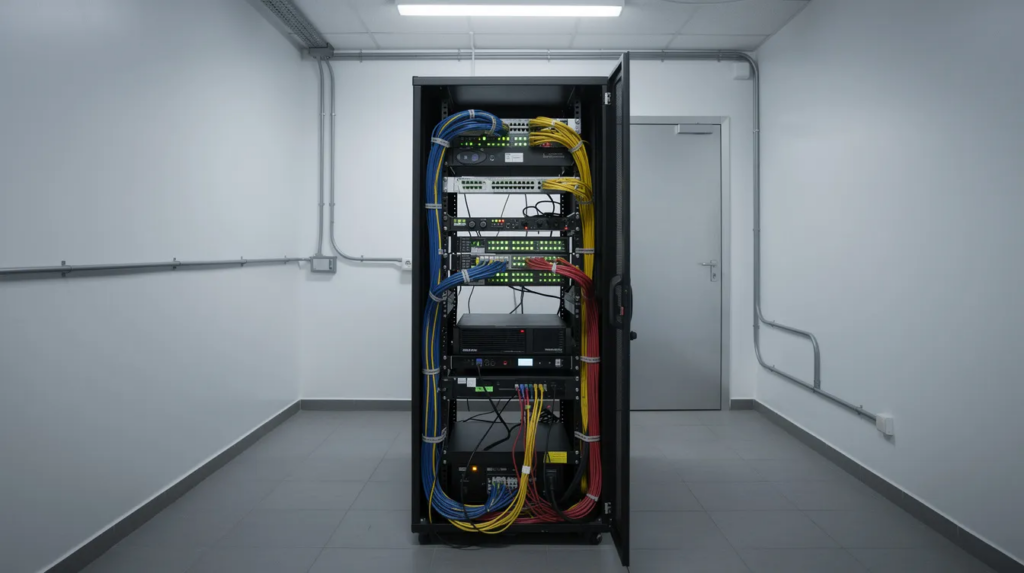
On-premise servers are physical servers, storage devices, and networking equipment located at the business facility. The organization owns and controls this equipment.
On-premise storage offers complete control over hardware and software, from the operating system to the physical infrastructure surrounding it.
In 2026, small businesses typically use one to three Windows or Linux servers. Most servers run in virtualized environments. A typical setup also includes a server rack, UPS, NAS, and backup appliance. Some businesses also rotate drives to an offsite location.
The physical hardware, server hardware, and backup equipment are all the organization’s responsibility.
On-premise systems require internal teams to manage and maintain the infrastructure. These teams handle procurement, installation, patching, upgrades, and incident response.
On-premises servers still suit several business needs. These include legacy ERP systems, accounting databases, and low-latency factory applications. They also support file servers for CAD and media-heavy workloads.
These environments benefit from local storage and local infrastructure where data control stays entirely within a controlled location.
The main advantage is direct control over the infrastructure. Businesses control configurations, maintenance windows, physical access, and security measures.
However, on-premise infrastructure creates several risks for small businesses. Small IT teams may struggle to manage the environment effectively. Local disasters such as fires, floods, and theft can also cause damage. Hardware failures can cause extended downtime without adequate redundancy.
What is a cloud server for small businesses?
A cloud server is a virtual server hosted in a remote data center. Third-party providers manage the infrastructure and deliver access over the internet. Businesses typically pay through subscriptions or pay-as-you-go pricing.
Cloud providers operate remote data centers and manage physical security, power, cooling, and infrastructure.
For most small businesses, cloud services combine several solutions. These include IaaS cloud servers for applications, cloud hosting for email, and cloud storage for files. Businesses can also use cloud storage for backups.
Cloud providers combine computing, storage, and networking resources in regional data centers. They provide access through self-service portals and APIs.
Providers manage cloud server maintenance, updates, and infrastructure security. As a result, small businesses can reduce pressure on internal IT teams.
For example, a 20- to 100-person company might run core applications on virtual servers. It can also use cloud storage for shared files and cloud backup for protection. Additionally, centralized identity and VPNs can provide secure remote access.
Cloud solutions work well for remote teams and variable workloads, and cloud-hosted servers support seamless collaboration among distributed employees. Cloud storage allows access from any location with internet, and scaling cloud resources can be done instantly with a few clicks.
Key characteristics that matter for a small business include rapid provisioning (minutes instead of weeks), the ability to scale CPU, RAM, and storage up or down, built-in availability features like geographic redundancy, and additional services such as managed disaster recovery.
Cloud solutions allow businesses to upgrade resources without replacing hardware. However, organizations still manage data protection, user access, and system configuration. IT partners can help businesses manage these responsibilities.
Cloud storage still requires businesses to manage user access and data policies. Therefore, organizations should not assume that providers manage these responsibilities for them.

Cloud vs On-Premise for Small Businesses: Pros and Cons
When comparing cloud vs on-premise for IT infrastructure, both cloud and on premises solutions have legitimate strengths. The question is which weaknesses your organization can tolerate and mitigate.
Cloud server advantages:
- Elasticity to handle seasonal or project-based workloads – cloud services enable access from anywhere with internet connectivity and offer pay-as-you-go pricing for resource flexibility
- Reduced capital expenditure – cloud storage usually lowers upfront costs for businesses, shifting spend to predictable budgeting on a monthly basis
- Easier support for remote teams and hybrid workers
- Stronger built-in options for business continuity, disaster recovery, and geographic redundancy
- Cloud providers manage backend systems, reducing pressure on internal IT teams
Cloud server drawbacks:
- Ongoing subscription costs that can increase with usage – cloud services can lead to unpredictable costs if not managed properly
- Internet connection reliability is crucial for accessing cloud services; outages affect operations
- Potential data residency and compliance questions under regulations like POPIA or GDPR
- Vendor lock-in once workflows and data are established in one cloud environment
On-premise server advantages:
- On-premise systems offer complete control over data and infrastructure – data stored on-premise is under direct control of the business
- Predictable performance inside the LAN for heavy workloads
- On-premise storage allows tailored security measures for specific needs
- On-premise solutions may have lower long-term costs for stable workloads
On-premise server weaknesses:
- On-premise storage requires significant upfront investment in hardware – larger initial investment
- Hardware refresh every five to seven years, plus ongoing costs for power, cooling, and physical security
- On-premises servers pose risks from local disasters like fire or theft
- On-premise systems require strong internal planning for security and backups; the burden of patching, monitoring, and incident response falls entirely in-house
Neither model is inherently more secure. Data on cloud servers is subject to the provider’s security measures, while on-premise servers ensure full visibility into data protection measures.
Risk posture depends on design, monitoring, and tested recovery – not simply where the server sits. Many businesses prefer a hybrid model, using both cloud and on-premise resources, especially when they need to balance cost effectiveness against direct control.
Cloud vs On-Premise: Cost, Scalability, and Lifecycle
Decision makers should compare total cost of ownership over a three to five year lifecycle rather than focusing only on monthly cloud fees or a server purchase price. Total cost of ownership should be calculated to compare cloud and on-premises setups accurately.
For on-premise infrastructure, a mid-range physical server in 2026 runs roughly $8,000 to $15,000 for hardware alone – dual CPU, mid-tier RAM, redundant storage – plus a NAS or backup appliance, UPS, rack setup, and software licenses.
Installation labor, extended warranties, and the cost of new hardware at refresh time add up.
Ongoing costs frequently underestimated include power consumption, cooling, physical security, spare parts, support contracts, and the opportunity cost of your IT team spending time on maintenance instead of strategic work.
On-premise storage often requires a larger initial investment than many organizations anticipate.
Cloud computing typically uses a pay-as-you-go pricing model: monthly instance fees for cloud servers, cloud storage and backup charges, data transfer costs, and support tiers.
Cloud storage typically uses a subscription-based pricing model that starts with a lower initial investment. But costs scale with usage, and without cost control practices like tagging, rightsizing, and monitoring idle resources, spend can drift.
Industry benchmarks show significant cost savings in cloud for many scenarios. Small businesses using cloud security have reported roughly 40 to 60 percent lower TCO over three years compared to equivalent on-premise security stacks.
One mid-market distributor achieved approximately $200,000 in savings over three years by moving disaster recovery to the cloud.
However, for stable, heavy workloads with high utilization in a single location, on-premise may reach cost parity after three to five years – provided the business also invests properly in redundancy, backup, and disaster recovery.
Cloud storage is easier to scale quickly, while scaling on-premises requires buying and installing new hardware, which introduces procurement delays and downtime.
Business requirements determine if cloud or on-premises solutions are optimal.
We recommend scenario modeling: compare the five-year cost of a well-specified on-premise server solution versus an equivalent cloud environment, including planned hardware refresh, to see how cash flow and predictable costs differ for your organization.
Cloud vs On-Premise: Security, Compliance, and Control
Both cloud and on premise servers can meet stringent data security and compliance requirements when properly designed. The difference lies in the responsibility model.
Reputable cloud providers handle physical data center security, base infrastructure hardening, data encryption options, logging, and compliance certifications such as SOC 2 Type II, ISO 27001, and HIPAA-eligible services.
Cloud providers offer advanced security features like encryption and access controls built into the platform. However, the customer remains responsible for identity management, configuration, data classification, and backup policies.
The shared responsibility model means your organization must still enforce robust security measures on its side – misconfigured cloud storage or overly permissive access controls remain leading causes of breach.
On-premise environments give you direct control over every layer. On-premise servers ensure full visibility into data protection measures, and the IT team manages patching, software updates, vulnerability management, endpoint protection, network segmentation, and monitoring.
The tradeoff is accountability: many small businesses struggle to keep up with patch cycles, and unlocked server rooms with weak physical security are common risk vectors. On-premise systems require strong internal planning for security and backups.
Regulatory or contractual drivers – such as industry-specific data residency rules or requirements to keep sensitive data in a specific jurisdiction – may favor on-premise or region-specific cloud deployments.
Cloud solutions may face additional compliance hurdles under regulations like POPIA, but cloud providers increasingly offer regional data centers and data processing agreements to address these needs.
IMS Cloud Services approaches both cloud systems and on-premise environments from a risk-based perspective: data encryption at rest and in transit, least-privilege user access, tested backup and recovery, and continuous improvement through regular audits.
Business continuity, backup, and disaster recovery
Business continuity is about how quickly your organization resumes operations after an incident – ransomware, hardware failure, or site loss – and how much data loss is acceptable.
Recovery Time Objective (RTO) defines how fast systems must return. Recovery Point Objective (RPO) defines the maximum tolerable data gap.
For purely on-premise setups, disaster recovery is challenging: reliance on a single location, backups stored in the same building, manual processes, and slow restore times for large datasets.
One 70-person manufacturer discovered their on-premise backups were 19 days stale after a ransomware event – and their offsite replica had silently failed.
After redesigning their backup strategy with geographic separation and immutable cloud storage, their RPO dropped to under 30 minutes and RTO for critical systems reached about four hours.
Cloud storage and cloud backup strengthen resilience even for on-premise environments by sending copies of critical data to geographically separate locations.
Disaster recovery is easier with cloud due to automated backup systems, replicated storage, and the ability to spin up server images in alternate regions. Cloud servers provide built-in redundancy and disaster recovery options that most small businesses cannot replicate on-site.
A concrete example: a 40-person insurance agency whose server room flooded was operational from home within 90 minutes because they had geo-redundant cloud backup and remote access configured. Similar businesses relying only on on-premise took three to five days to recover.
IMS Cloud Services specializes in designing and testing disaster recovery plans for both cloud and on-premise environments, with clear RTO and RPO targets tailored to small business risk tolerance.

Performance, connectivity, and user experience
User experience depends on latency, bandwidth, and workload patterns – not just on whether servers are cloud or on premise.
On premise servers have a clear edge for low-latency access to very large files (CAD, video editing), heavy database workloads inside a single office, and workflows tightly coupled to local equipment or production lines.
Local infrastructure eliminates the round-trip delay inherent in cloud access.
Cloud hosting performs well when connectivity is robust. Distributed teams across multiple cities, remote and hybrid workers, and customer-facing portals all benefit from cloud delivery.
For many small businesses already using cloud collaboration platforms, much of the daily work already occurs in the cloud, reducing the marginal performance benefit of maintaining large on-premise servers.
Practical considerations: invest in reliable business-grade internet (dedicated fiber, SLAs), consider redundant links, and plan for brief outages with offline modes or local caching. Internet connection reliability is crucial – without it, cloud access stalls.
We recommend testing real workloads before committing: pilot deployments with limited user groups and performance monitoring reveal whether a cloud or on-premise model delivers the experience your team needs.
Practical decision framework: cloud, on-premise, or hybrid?
The best server solution is driven by business priorities: risk tolerance, compliance constraints, cash flow, growth plans, and internal IT capabilities.
A straightforward framework for small and medium-sized organizations:
- Inventory applications, data, and storage solution dependencies
- Categorize each by sensitivity, regulatory requirements, and performance needs
- Map each workload to cloud, on premise, or hybrid options
As a rule of thumb, commodity services – email, collaboration, basic file sharing – usually belong in the cloud. Specialized, latency-sensitive, or legacy line-of-business applications may remain on-premise or be migrated later in phases.
Hybrid models can combine both cloud and on-premises resources effectively, and this pattern is increasingly common in 2026: core productivity tools and backups in the cloud, some applications on-premise, and cloud-based disaster recovery ready to take over if local infrastructure fails.
Avoid large-scale migrations all at once. Phased adoption with clear checkpoints, tested backups, and guardrails for cost control reduces risk.
An experienced partner like IMS Cloud Services can translate this framework into a concrete roadmap – architecture design, backup and disaster recovery planning, and security hardening across both cloud and on-premise assets.
Next steps for IT and cybersecurity decision makers
Small businesses do not have to choose between cloud and on-premise in absolute terms. The right strategy matches your organization’s requirements for security, continuity, and growth.
Specific next steps worth prioritizing:
- Conduct a structured asset inventory – servers, applications, data, dependencies
- Review existing backup and disaster recovery capabilities, including when backups were last tested
- Examine internet resilience – broadband quality, redundancy, uptime SLAs
- Identify regulatory constraints on data location (HIPAA, PCI-DSS, CMMC, POPIA)
- Define clear business objectives: target recovery times, acceptable monthly budgets, and expected growth over three to five years
Before finalizing a cloud vs on-premise strategy, align stakeholders across finance, operations, compliance, and IT on priorities and risk tolerance.
IMS Cloud Services can support this process by assessing current infrastructure, identifying risks in both cloud and on-premise environments, and designing data backup and disaster recovery solutions matched to your organization’s size and regulatory profile.
Infrastructure decisions should be treated as part of a broader resilience and security program – not a one-time hardware or subscription purchase. Start with the assessment, build the plan, and invest where the risk reduction is greatest.